My Sites


Sunday, July 5, 2015

“No 'Access-Control-Allow-Origin' header is present on the requested resource” SOLUTION

XMLHttpRequest cannot load http://myApiUrl/login. No
'Access-Control-Allow-Origin' header is present on the requested
resource. Origin 'null' is therefore not allowed access.
//Create a parseData json object
var parseData = {token : userToken};

var request = $.ajax({
        url: "http://localhost:8080/configurations/authenticate",
        type: "post",
        data: parseData
    });

http://davidwalsh.name/cdn-fonts
Cross-Origin Request Blocked: The Same Origin Policy disallows reading the remote resource at https://grid-static-stg.pearson.com/57-mlpui/0.0.4/assets/fonts/pearson-symbols/pearson-symbols.ttf. (Reason: CORS header 'Access-Control-Allow-Origin' missing).

 

Center a column using Twitter Bootstrap 3

http://stackoverflow.com/questions/18153234/center-a-column-using-twitter-bootstrap-3

https://shapebootstrap.net
http://www.wpfreeware.com/tutorial/outstanding-bootstrap-ecommerce-templates-free-premium/

The first approach uses Bootstrap's own offset classes so it requires no change in markup and no extra CSS. The key is to set an offset equal to half of the remaining size of the row. So for example, a column of size 2 would be centered by adding an offset of 5, that's (12-2)/2.
In markup this would look like:
<div class="row">
    <div class="col-md-2 col-md-offset-5"></div>
</div>

Friday, July 3, 2015

JQuery form submit + HTML 5 place holder conflict SOLUTION

<form id="sampleForm" >
  <input type="text" id="studentID" required />
  <button type="submit"> Submit </button>
</form>

$('#sampleForm').on('submit', function(e) { //use on if jQuery 1.7+        
e.preventDefault();  //prevent form from submitting/refreshing       
    });

MODAL SOLUTION
$('#myModal').modal('toggle');

Sunday, June 28, 2015

GIT essentials

git remote show origin
git remote set-url origin git://new.url.here

Bower essentials

npm install -g bower
bower install 
bower install jquery 
bower init


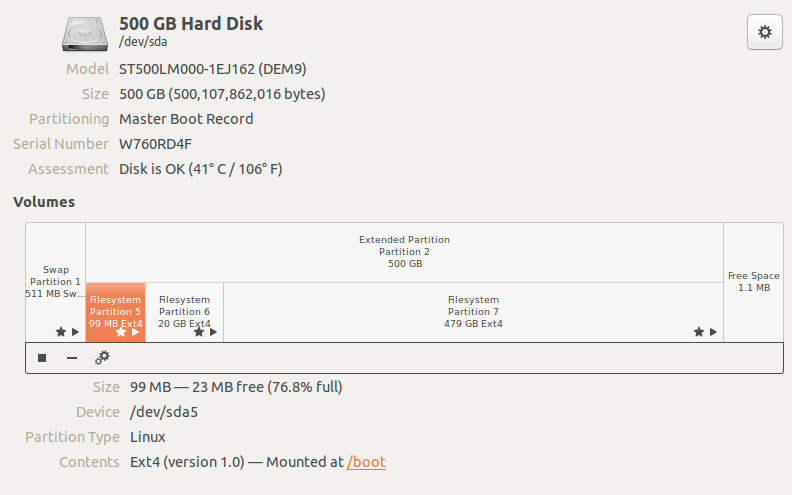
Linux Hard Disk Partitioning


Mobile First With Bootstrap 3

Device compatibility
<meta name="viewport" content="width=device-width, initial-scale=1.0">

Language and character encode
 <meta http-equiv="Content-Type" content="text/html; charset=utf-8" />


<div class="container">
    <div class="row">
        <div class="col-xs-6">col-xs-6</div>
        <div class="col-xs-6">col-xs-6</div>
    </div>

</div>

Fonts
https://www.myfonts.com/topwebfonts/
https://www.google.com/fonts

https://www.youtube.com/watch?v=vUn9sBStMLA