My Sites


Saturday, October 1, 2016

Developer Interview Essentials

Java Collections
http://javahungry.blogspot.com/2015/05/50-java-collections-interview-questions-and-answers.html

Data Structures and algorithms
http://javahungry.blogspot.com/p/data-structures-in-java.html

Big O notation cheatsheet
http://bigocheatsheet.com/

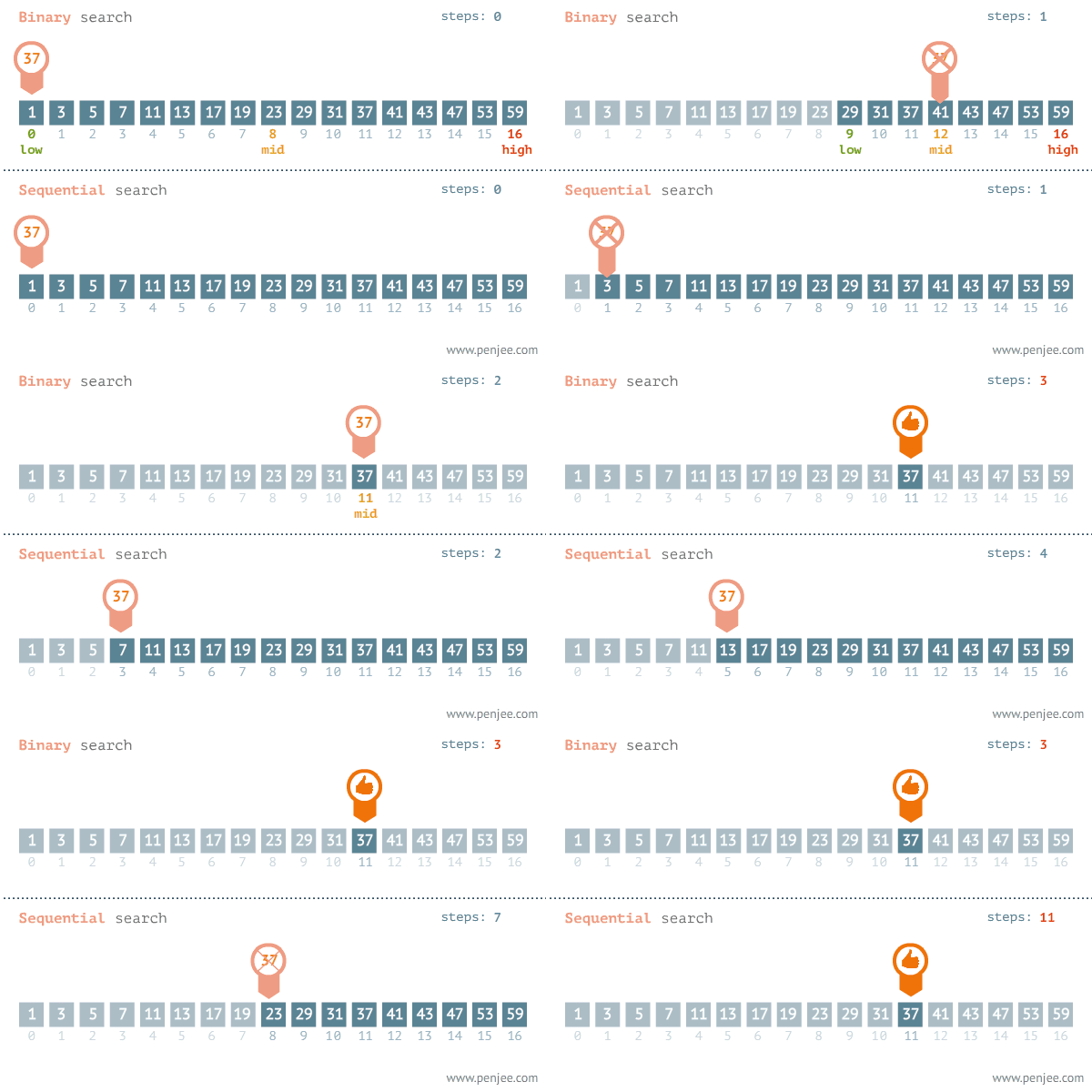
Linear and Binary Search (Best Case : Average case:   Worst Case: O(n))


Bubble Sort  (Best Case : Average case:   Worst Case: )


Selection Sort  (Best Case : Average case:   Worst Case: O(n))


Insertion Sort  (Best Case : Average case:   Worst Case: O(n))


Merge sort  (Best Case : Average case:   Worst Case: O(n))


Quick Sort  (Best Case : Average case:   Worst Case: O(n))


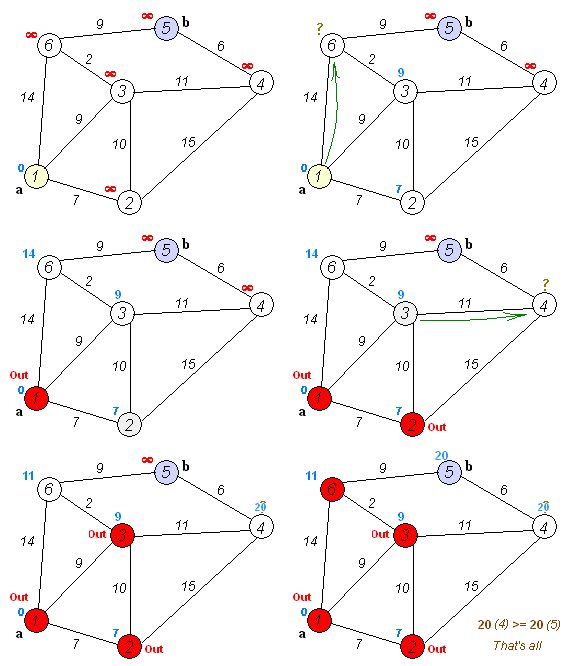
Dijkstra's algorithm - Finding the shortest paths between nodes in a graph.


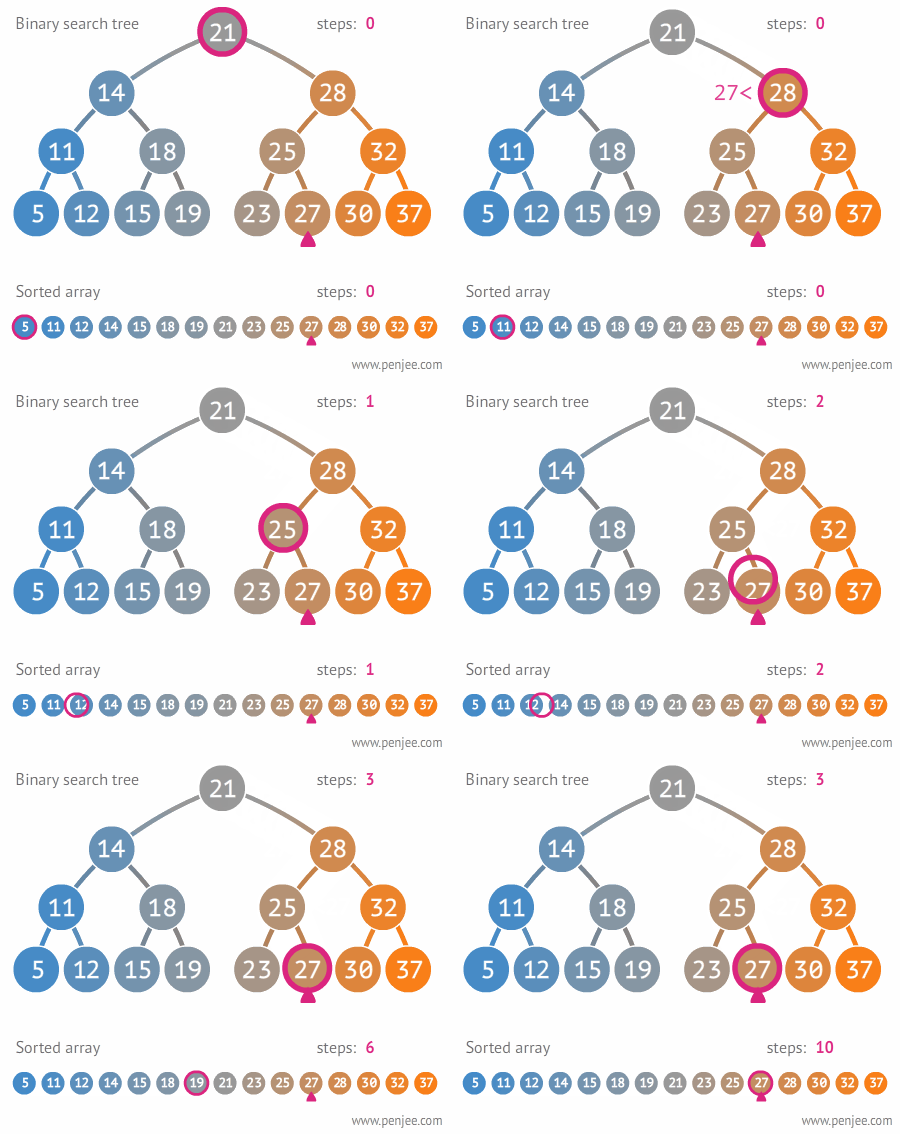
Binary search tree - http://stackoverflow.com/questions/2130416/what-are-the-applications-of-binary-trees


Tree Rotation


Depth-first search (DFS) -  algorithm for traversing or searching tree or graph data structures

Breadth-first search (BFS) -  algorithm for traversing or searching tree or graph data structures
http://stackoverflow.com/questions/3332947/when-is-it-practical-to-use-dfs-vs-bfs

Stack and Queue
https://www.tutorialspoint.com/data_structures_algorithms/stack_algorithm.htm
https://www.tutorialspoint.com/data_structures_algorithms/dsa_queue.htm


References : Extracted from Internet.


Monday, September 19, 2016

Nodejs Developer - Production Best Practises : Demystifying how clustering works ( CPU Threads vs Cores vs Sockets vs Processes)

First thing first. Every application needs to be optimized and perform fast. When it's come to Nodejs, you will come across many best practices to optimize your Nodejs application with tremendous performance and reliability; especially in the production environment.
Most of the Nodejs applications use Express as the Nodejs web framework. And there, they have specifically mentioned a lot of production best practices covering performance aspects and reliability aspects. Basically, the things to do in your code and environment/setup which will ultimately improve your application performance. Below article will guide through those best practices.
https://expressjs.com/en/advanced/best-practice-performance.html

But what I want to emphasize in my article is one fact among that list; which is 'Run your app in a cluster'. Basically, a single instance of Node.js runs in a single thread. To take advantage of multi-core systems  you will sometimes want to launch a cluster of Node.js processes to handle the load. Following is the note provided by them.
'Clustering is made possible with Node’s cluster module. This enables a master process to spawn worker processes and distribute incoming connections among the workers. However, rather than using this module directly, it’s far better to use one of the many tools out there that does it for you automatically; for example node-pm or cluster-service.'

Anyway, here what I want to talk about is the Node's cluster module. How it works with the CPU. Of course, you can copy paste the code given in the documentation and it will surely work as a charm. But what is actually happening inside the CPU with regards to this. Let's have a look in depth.

First We'll look how CPU (Central processing unit) works. Here mainly we talk about # of threads and # of cores. In following snapshot, in the left hand side it shows my local machine CPU information (Intel(R) Core(TM) i7-4600M CPU @ 2.90GHz) and in the right side it shows the CPU information of a AWS C1.xlarge server (Intel(R) Xeon(R) CPU E5-2651 v2 @ 1.80GHz).

CPU information can be displayed by following Linux commands.
cat /proc/cpuinfo
lscpu


Here CPU(s) means # of threads eventually logical cores. So in this case, my cluster enabled Node.js application will run in 4 processes in my local machine and will run 8 processes in the AWS server.

And here we can find Core(s) per socket and No. of sockets. In my local machine, the total No. of cores are 2 which is Dual core (Actual hardware). And in AWS server, there is only 1 core (Actual hardware). And from Thread(s) per core will give you the idea of about the relationship between threads and cores.

A core is the physical hardware that works on the thread. In general a processor can only work on one thread per core, CPUs with hyper-threading enabled can work on up to two threads per core. In this case, my local machine is hyper-threading enabled.


This i7 CPU has only 2 cores, but can handle 2x2=4 threads , and hence appears as a quad core to the OS.(4 logical cores).

Hope this will give you an understanding about, how CPU behaves and how clustering relates with the CPU. Cheers!!! :)

Friday, July 15, 2016

Mongo backup and authentication

mongodump -d myDatabase -o ~/backups/first_backup
$mongod --auth
db.createUser({user:"admin_name", pwd:"1234",roles:["readWrite","dbAdmin"]})

If you want to add without roles (optional):
db.createUser({user:"admin_name", pwd:"1234", roles:[]}) to check if authenticated or not:
db.auth("admin_name", "1234") it should give you:
1 else :
Error: Authentication failed. 0


mongo restore

mongorestore dump-2013-10-25/
https://docs.mongodb.com/manual/tutorial/backup-and-restore-tools/

install mongo
https://docs.mongodb.com/v3.0/tutorial/install-mongodb-on-amazon/


Everything you need to know about nvm

Install/ Update NVM
curl -o- https://raw.githubusercontent.com/creationix/nvm/v0.31.2/install.sh | bash
or
wget -qO- https://raw.githubusercontent.com/creationix/nvm/v0.31.2/install.sh | bash

source ~/.bashrc
nvm ls-remote command results in “N/A”
export NVM_NODEJS_ORG_MIRROR=http://nodejs.org/dist

nvm ls-remote
nvm install 5.0
nvm use 5.0
nvm run 5.0 --version
nvm which 5.0

Saturday, July 2, 2016

Node.js Clustering - 4 Core = 4 Processes

var cluster = require('cluster');

if (cluster.isMaster) {
  // Count the machine's CPUs
  var cpuCount = require('os').cpus().length;

  // Create a worker for each CPU
  for (var i = 0; i < cpuCount; i += 1) {
    cluster.fork();
  }

  // Listen for dying workers
  cluster.on('exit', function () {
    cluster.fork();
  });
} else {
  require('./server');
}

Nginx - Proxy to Express Application, Load Balancer, Static Cache Files

sudo apt-get update
sudo apt-get install nginx
sudo service nginx start 
sudo service nginx stop
nano /etc/nginx/site_enabled/default

upstream project {
server 33.22.22.5:3000;
server 33.22.22.6:3000;
server 33.22.22.7:3000;
}
server {
listen 80;
location / {
proxy_pass http://project;
}
location ~* \.(css|js|gif|jpe?g|png)$ {
expires 168h;
}
location /api {
expires 10m;
}
}

How add an automatic load to the server (Performance wise check)
Bench test for 1000 requests
ab -c 40 -n 1000 http://33.22.22.5/

Thursday, May 26, 2016

Blocked loading mixed active content

It means you're calling http from https

What is Mixed Content?
When a user visits a page served over HTTP, their connection is open for eavesdropping and man-in-the-middle (MITM) attacks. When a user visits a page served over HTTPS, their connection with the web server is authenticated and encrypted with SSL and hence safeguarded from eavesdroppers and MITM attacks.

However, if an HTTPS page includes HTTP content, the HTTP portion can be read or modified by attackers, even though the main page is served over HTTPS. When an HTTPS page has HTTP content, we call that content “mixed”. The webpage that the user is visiting is only partially encrypted, since some of the content is retrieved unencrypted over HTTP. The Mixed Content Blocker blocks certain HTTP requests on HTTPS pages.

You can disable mixed content blocking completely.