My Sites


Sunday, June 11, 2017

Simple Must know SQL and NOSQL hacks

PostgreSQL Hacks
Install

sudo apt-get update
sudo apt-get install postgresql postgresql-contrib
sudo -i -u postgres
psql
Exit out of the PostgreSQL prompt by typing: \q
createdb test1
 \connect test1
CREATE TABLE table_name (
    column_name1 col_type (field_length) column_constraints,
    column_name2 col_type (field_length),
    column_name3 col_type (field_length)
);

MySQL Hacks
mysql -u root -p myDatabase
show databases;
use myDatabase;
show tables;
select * from table;

Take MySQL dump
mysqldump -u [uname] -p db_name > db_backup.sql

restore data dump
mysql -u root -p devengoDev < db_backup.sql

Reset MySQL Password
https://help.ubuntu.com/community/MysqlPasswordReset

sudo /etc/init.d/mysql stop
sudo /usr/sbin/mysqld --skip-grant-tables --skip-networking &
mysql -u root
FLUSH PRIVILEGES;
SET PASSWORD FOR root@'localhost' = PASSWORD('password');
UPDATE mysql.user SET Password=PASSWORD('newpwd') WHERE User='root';
FLUSH PRIVILEGES;
sudo /etc/init.d/mysql stop
sudo /etc/init.d/mysql start

MongoDB Hacks
Setup
https://docs.mongodb.com/v3.0/tutorial/install-mongodb-on-ubuntu/

sudo apt-key adv --keyserver hkp://keyserver.ubuntu.com:80 --recv EA312927
echo "deb http://repo.mongodb.org/apt/ubuntu trusty/mongodb-org/3.2 multiverse" | sudo tee /etc/apt/sources.list.d/mongodb-org-3.2.list
sudo apt-get update
sudo apt-get install -y mongodb-org
sudo service mongod start
sudo service mongod stop

mongodump -d myDatabase -o ~/backups/first_backup
mongorestore -d myDatabase ~/backups/first_backup

use mydb
show dbs
db.dropDatabase()
db.createCollection("mycollection")
show collections
db.createCollection("mycol", { capped : true, autoIndexId : true, size : 
   6142800, max : 10000 } )
db.mycol.insert({
   title: 'MongoDB Overview', 
   description: 'MongoDB is no sql database',
   by: 'tutorials point',
   url: 'http://www.tutorialspoint.com',
   tags: ['mongodb', 'database', 'NoSQL'],
   likes: 100
})
db.movie.insert({"name":"tutorials point"})
db.COLLECTION_NAME.drop()
db.mycol.find().pretty()
db.mycol.find(
   {
      $and: [
         {key1: value1}, {key2:value2}
      ]
   }
).pretty()
db.mycol.find(
   {
      $or: [
         {key1: value1}, {key2:value2}
      ]
   }
).pretty()
db.mycol.find({"likes": {$gt:10}, $or: [{"by": "tutorials point"},
   {"title": "MongoDB Overview"}]}).pretty()
{
   "_id": ObjectId(7df78ad8902c),
   "title": "MongoDB Overview", 
   "description": "MongoDB is no sql database",
   "by": "tutorials point",
   "url": "http://www.tutorialspoint.com",
   "tags": ["mongodb", "database", "NoSQL"],
   "likes": "100"
}
db.mycol.update({'title':'MongoDB Overview'},{$set:{'title':'New MongoDB Tutorial'}})
db.mycol.update({'title':'MongoDB Overview'},{$set:{'title':'New MongoDB Tutorial'}},{multi:true})
db.mycol.remove({'title':'MongoDB Overview'})
db.mycol.find({},{"title":1,_id:0}).limit(2)
db.mycol.find({},{"title":1,_id:0}).sort({"title":-1})
db.mycol.ensureIndex({"title":1})

db.mycol.aggregate([{$group : {_id : "$by_user", num_tutorial : {$sum : 1}}}])
{
   "result" : [
      {
         "_id" : "tutorials point",
         "num_tutorial" : 2
      },
      {
         "_id" : "Neo4j",
         "num_tutorial" : 1
      }
   ],
   "ok" : 1
}

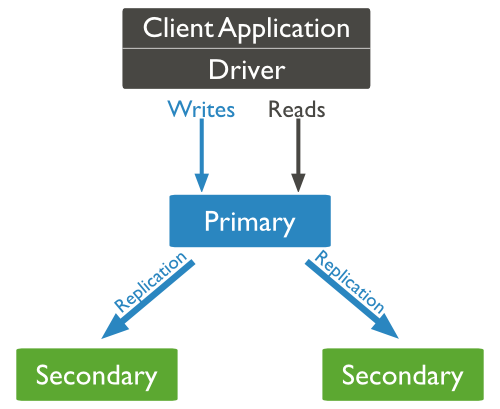
Mongo Clustering
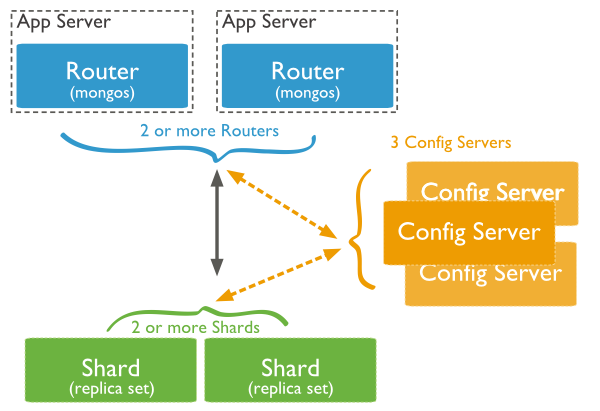
Mongo Sharding
Saturday, February 11, 2017

How does Sri Lanka get Internet ?

Hi folks,
By doing so research I found some nice articles and data sources regarding how Sri Lanka gets Internet through submarine communication cables (obviously :D).

What is a submarine communication cable ?
A submarine communications cable is a cable laid on the sea bed between land-based stations to carry telecommunication signals across stretches of ocean. The first submarine communications cables, laid in the 1850s, carried telegraphy traffic.


Source : https://en.wikipedia.org/wiki/Submarine_communications_cable

The complete submarine cable map can be found in http://www.submarinecablemap.com/

Now in Sri Lanka there are several major Internet providers such as SLT, Dialog, Airtel and etc...
Primarily there are 2 major submarine cables which provides Internet to Sri Lanka.
  1. Bay of Bengal Gateway (BBG) -  Dialog
  2. SEA-ME-WE 3 - SLT
And the landing point of most of the cables is Mount Lavinia. Following map illustrates the landing point of submarine cables in Sri Lanka.http://www.submarinecablemap.com/#/landing-point/mt-lavinia-sri-lanka
 
Bay of Bengal Gateway (BBG) 

The Bay of Bengal Gateway (BBG) is a submarine communications cable being built to provide a direct trunk connection between Barka (Sultanate of Oman) and Penang (Malaysia) with four branches to Fujairah (UAE), Mumbai (India), Colombo (Sri Lanka) and Chennai (India). The project is being carried out by a consortium that includes Vodafone, Omantel, Etisalat, Reliance Jio Infocomm, Dialog and Telekom Malaysia.

Note : This cable consists a speed of 6.4 Terrabits Per Second (Tbps) of international bandwidth to Sri Lanka. Furthermore, now adays this is identified as a 100Gbps-plus submarine cable.

In news (Tuesday 30th May 2016) : 
Sri Lanka’s premier telecommunications service provider, Dialog Axiata PLC, announced this week, the connection of Sri Lanka to the Ultra High Capacity 100G-PLUS Bay of Bengal Gateway (BBG) Submarine Fibre Optic Cable via its state-of-the-art Cable Landing Station (CLS) at Mount Lavinia (South Colombo).


Source : https://en.wikipedia.org/wiki/Bay_of_Bengal_Gateway 
https://www.dialog.lk/dialog-connects-sri-lanka-to-ultra-high-speed-100g-plus-submarine-cable
https://www.bayofbengalgateway.com/

More about Dialog Axiata Network (MTN Networks) : https://en.wikipedia.org/wiki/Dialog_Axiata 

As some of you may heard already, in early 20's there was a problem with receiving Internet to the country from the global Internet, due to a damage in digital fiber optic submarine cable. I found the following article related to that incident which explains a lot about the problem which occurred in  Aug, 2004.

http://www.networkworld.com/article/2324749/system-management/sri-lankan-internet-services-restored-after-cable-cut.html


SEA-ME-WE 3

SEA-ME-WE 3 or South-East Asia - Middle East - Western Europe 3 is an optical submarine telecommunications cable linking those regions and is the longest in the world, completed in late 2000. It is led by France Telecom and China Telecom, and is administered by Singtel, a telecommunications operator owned by the Government of Singapore. The Consortium is formed by 92 other investors from the telecom industry. It was commissioned in March 2000.

Note : SLT gets internet through this cable.

Source : http://www.seamewe5.com/
https://en.wikipedia.org/wiki/SEA-ME-WE_3
http://www.smw3.com/
https://en.wikipedia.org/wiki/Submarine_communications_cable

i2i cable network

Bharti Airtel has two international landing stations in Chennai, one connects with the i2i cable network between Chennai and Singapore, the other connects with the SEA-ME-WE 4.

Singapore Telecommunications Limited, commonly abbreviated as Singtel, is a Singaporean telecommunications company, with a combined mobile subscriber base of over 600 million customers in 25 countries at end of July, 2016,[1] making it one of the largest mobile network operators in Singapore and the 20–30 largest in the world.

Singtel has expanded aggressively outside its home market and owns shares in many regional operators, including 100% of the second largest Australian telco, Optus, which was acquired in 2001 from Cable & Wireless and other shareholders of Optus, and 32.15% [5] of Bharti Airtel, the largest carrier in India.

Source : https://en.wikipedia.org/wiki/Singtel
http://www.submarinenetworks.com/stations/asia/india/chennai-bharti

Hope you learned something new !! Cheers !!

Ubuntu Quick Hacks - Unity Panel

In case you lost the date time in the Ubuntu unity panel (top bar), please use the following commands and the problem will be solved!! Cheers

sudo apt-get install indicator-datetime
sudo dpkg-reconfigure --frontend noninteractive tzdata
sudo killall unity-panel-service

Tuesday, November 29, 2016

SSH key-based authentication related errors and fixes

Could not open a connection to your authentication agent.
eval `ssh-agent -s`
ssh-add


Add private key permanently with ssh-add on Ubuntu.
ssh-add keyname (This is the temporaray fix)
Permanant Fix


Add keys in ~/.ssh/config file:
  IdentityFile ~/.ssh/gitHubKey
  IdentityFile ~/.ssh/id_rsa_buhlServer 


Permissions 0777 for '/Users/username/.ssh/id_rsa' are too open. It is recommended that your private key files are NOT accessible by others. This private key will be ignored.

chmod 400 ~/.ssh/id_rsa
chmod 600 ~/.ssh/id_rsa


How To Configure SSH Key-Based Authentication on a Linux Server
https://www.digitalocean.com/community/tutorials/how-to-configure-ssh-key-based-authentication-on-a-linux-server

Generate a SSH key pair by typing: ssh-keygen
Copy the contents of your ~/.ssh/id_rsa.pub key into a file in the remote account's home ~/.ssh directory called
authorized_keys.

Default ssh key is id_rsa


RSA authentication with openssh
http://cects.com/openssh-rsa-authentication-for-windows-and-linux/

Saturday, October 1, 2016

Developer Interview Essentials

Java Collections
http://javahungry.blogspot.com/2015/05/50-java-collections-interview-questions-and-answers.html

Data Structures and algorithms
http://javahungry.blogspot.com/p/data-structures-in-java.html

Big O notation cheatsheet
http://bigocheatsheet.com/

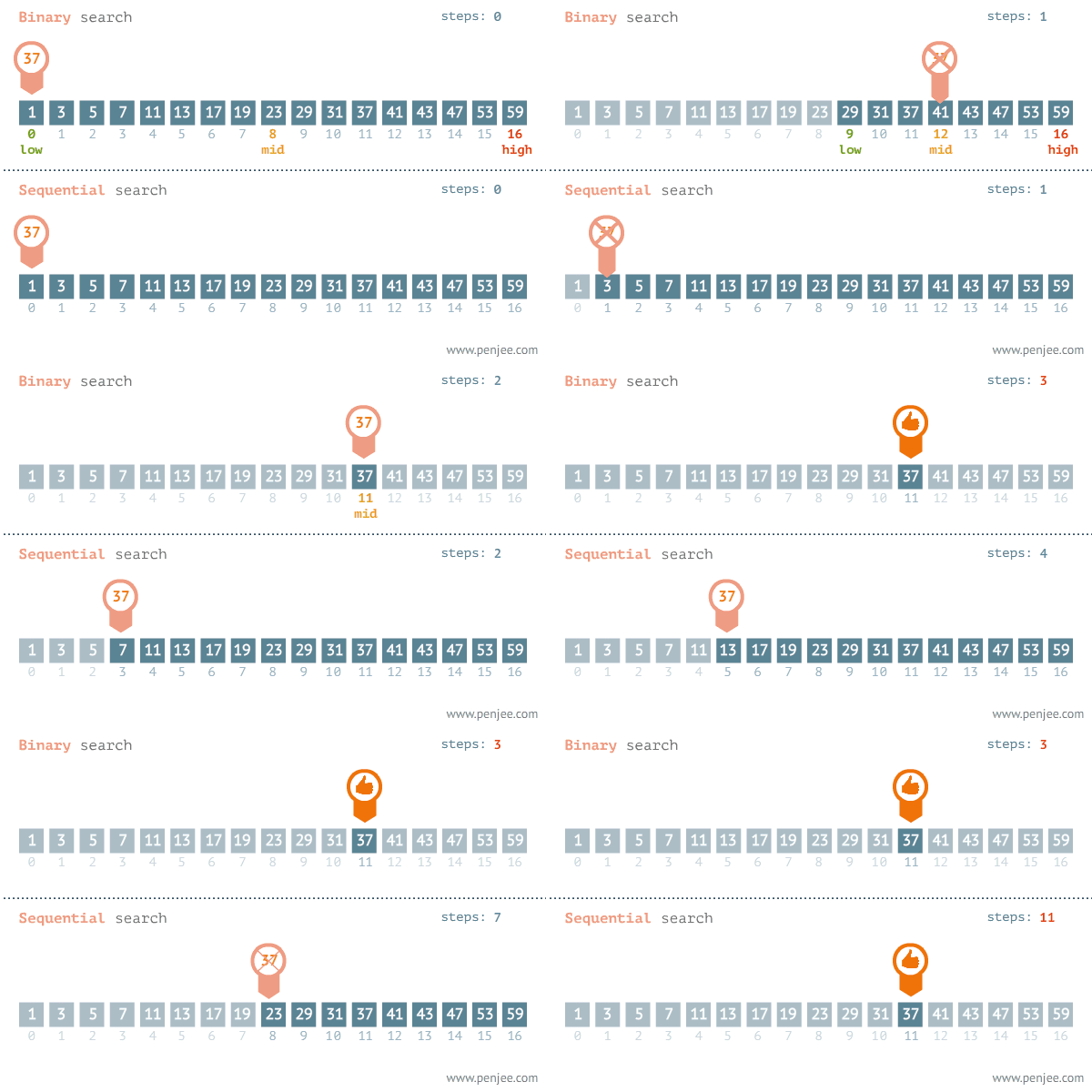
Linear and Binary Search (Best Case : Average case:   Worst Case: O(n))


Bubble Sort  (Best Case : Average case:   Worst Case: )


Selection Sort  (Best Case : Average case:   Worst Case: O(n))


Insertion Sort  (Best Case : Average case:   Worst Case: O(n))


Merge sort  (Best Case : Average case:   Worst Case: O(n))


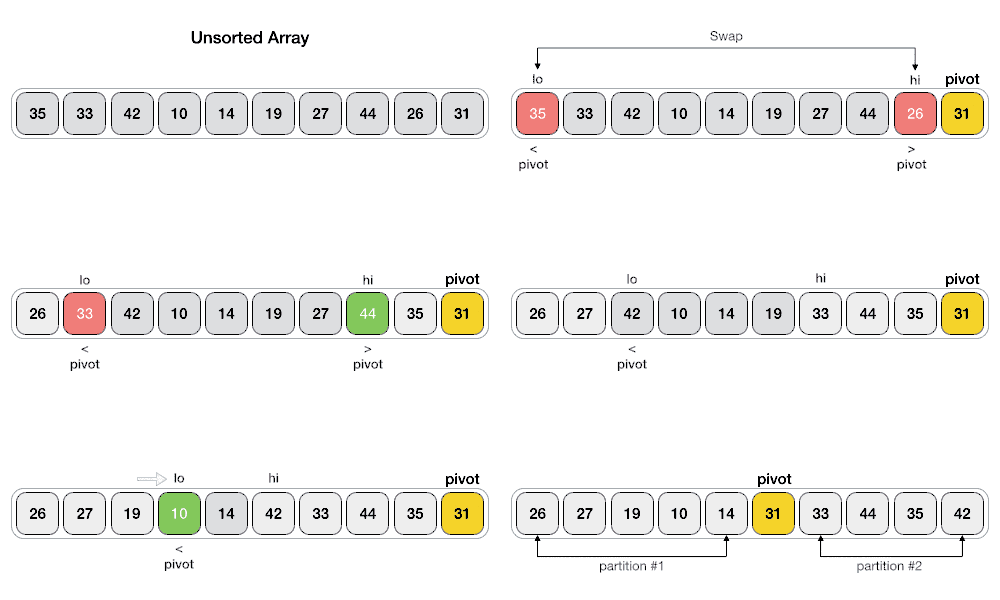
Quick Sort  (Best Case : Average case:   Worst Case: O(n))


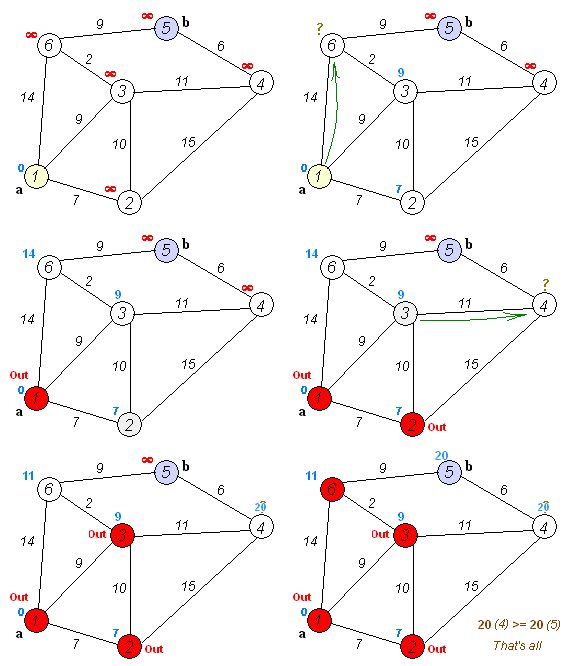
Dijkstra's algorithm - Finding the shortest paths between nodes in a graph.


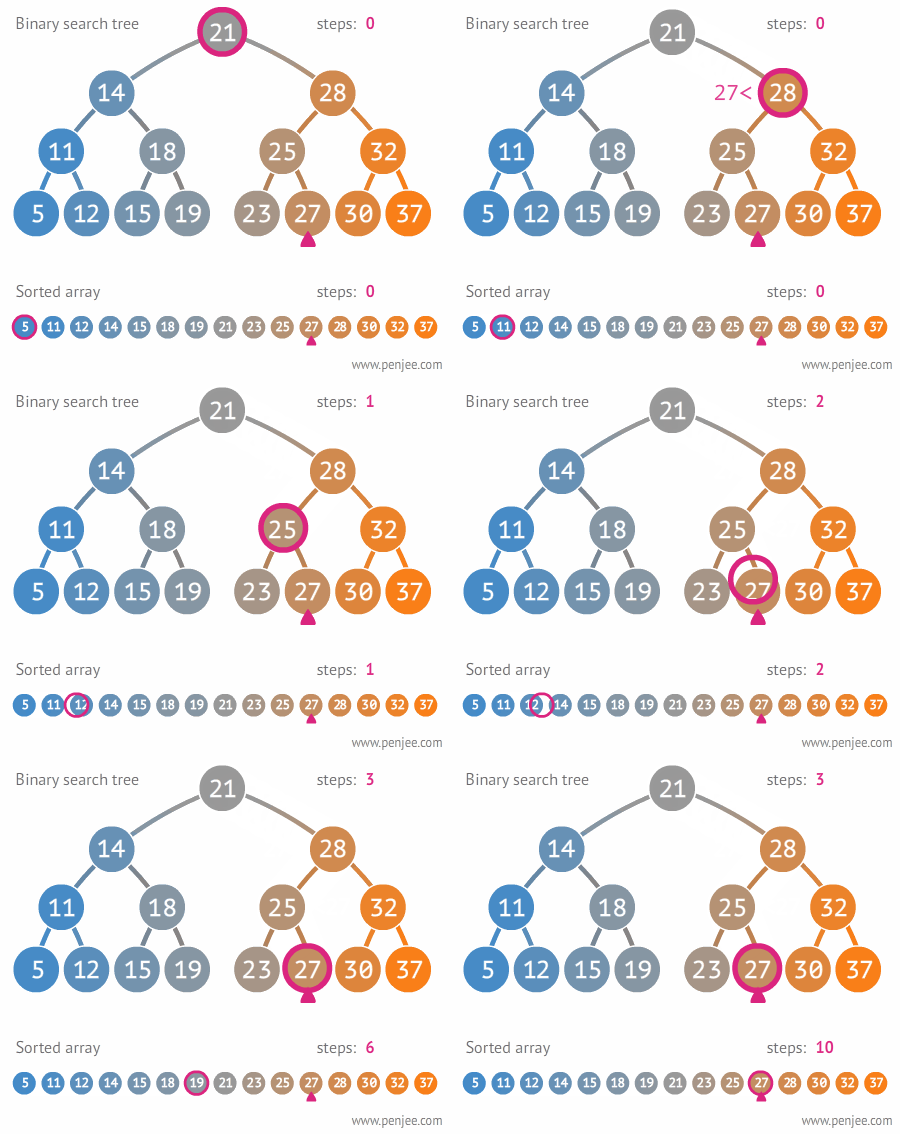
Binary search tree - http://stackoverflow.com/questions/2130416/what-are-the-applications-of-binary-trees


Tree Rotation


Depth-first search (DFS) -  algorithm for traversing or searching tree or graph data structures

Breadth-first search (BFS) -  algorithm for traversing or searching tree or graph data structures
http://stackoverflow.com/questions/3332947/when-is-it-practical-to-use-dfs-vs-bfs

Stack and Queue
https://www.tutorialspoint.com/data_structures_algorithms/stack_algorithm.htm
https://www.tutorialspoint.com/data_structures_algorithms/dsa_queue.htm


References : Extracted from Internet.


Monday, September 19, 2016

Nodejs Developer - Production Best Practises : Demystifying how clustering works ( CPU Threads vs Cores vs Sockets vs Processes)

First thing first. Every application needs to be optimized and perform fast. When it's come to Nodejs, you will come across many best practices to optimize your Nodejs application with tremendous performance and reliability; especially in the production environment.
Most of the Nodejs applications use Express as the Nodejs web framework. And there, they have specifically mentioned a lot of production best practices covering performance aspects and reliability aspects. Basically, the things to do in your code and environment/setup which will ultimately improve your application performance. Below article will guide through those best practices.
https://expressjs.com/en/advanced/best-practice-performance.html

But what I want to emphasize in my article is one fact among that list; which is 'Run your app in a cluster'. Basically, a single instance of Node.js runs in a single thread. To take advantage of multi-core systems  you will sometimes want to launch a cluster of Node.js processes to handle the load. Following is the note provided by them.
'Clustering is made possible with Node’s cluster module. This enables a master process to spawn worker processes and distribute incoming connections among the workers. However, rather than using this module directly, it’s far better to use one of the many tools out there that does it for you automatically; for example node-pm or cluster-service.'

Anyway, here what I want to talk about is the Node's cluster module. How it works with the CPU. Of course, you can copy paste the code given in the documentation and it will surely work as a charm. But what is actually happening inside the CPU with regards to this. Let's have a look in depth.

First We'll look how CPU (Central processing unit) works. Here mainly we talk about # of threads and # of cores. In following snapshot, in the left hand side it shows my local machine CPU information (Intel(R) Core(TM) i7-4600M CPU @ 2.90GHz) and in the right side it shows the CPU information of a AWS C1.xlarge server (Intel(R) Xeon(R) CPU E5-2651 v2 @ 1.80GHz).

CPU information can be displayed by following Linux commands.
cat /proc/cpuinfo
lscpu


Here CPU(s) means # of threads eventually logical cores. So in this case, my cluster enabled Node.js application will run in 4 processes in my local machine and will run 8 processes in the AWS server.

And here we can find Core(s) per socket and No. of sockets. In my local machine, the total No. of cores are 2 which is Dual core (Actual hardware). And in AWS server, there is only 1 core (Actual hardware). And from Thread(s) per core will give you the idea of about the relationship between threads and cores.

A core is the physical hardware that works on the thread. In general a processor can only work on one thread per core, CPUs with hyper-threading enabled can work on up to two threads per core. In this case, my local machine is hyper-threading enabled.


This i7 CPU has only 2 cores, but can handle 2x2=4 threads , and hence appears as a quad core to the OS.(4 logical cores).

Hope this will give you an understanding about, how CPU behaves and how clustering relates with the CPU. Cheers!!! :)